
A Free Course to Help You Get the Most Out of ProSlab IQ

ProSlab IQ™ is here, and FireFly Robotics has put together a free training course to help operators get up to speed quickly and confidently.

Two years in the making, ProSlab IQ is the most highly tested harvester software FireFly has ever released. It comes standard on the new ProSlab 165 — FireFly’s manned robotic harvester built for turfgrass producers who need speed and precision on every pallet — and it’s available as an upgrade for ProSlab 155C and ProSlab 160 harvesters. If you want the details on eligibility, installation, and Mercury data services that pair with it, the Mercury Data Services page has everything you need.
ProSlab IQ™ is here, and FireFly Robotics has put together a free training course to help operators get up to speed quickly and confidently.

Two years in the making, ProSlab IQ is the most highly tested harvester software FireFly has ever released. It comes standard on the new ProSlab 165 — FireFly’s manned robotic harvester built for turfgrass producers who need speed and precision on every pallet — and it’s available as an upgrade for ProSlab 155C and ProSlab 160 harvesters. If you want the details on eligibility, installation, and Mercury data services that pair with it, the Mercury Data Services page has everything you need.

What’s Actually Changed

Most of the core functions of the harvester work the way they always have. What’s different is how that information gets to you.

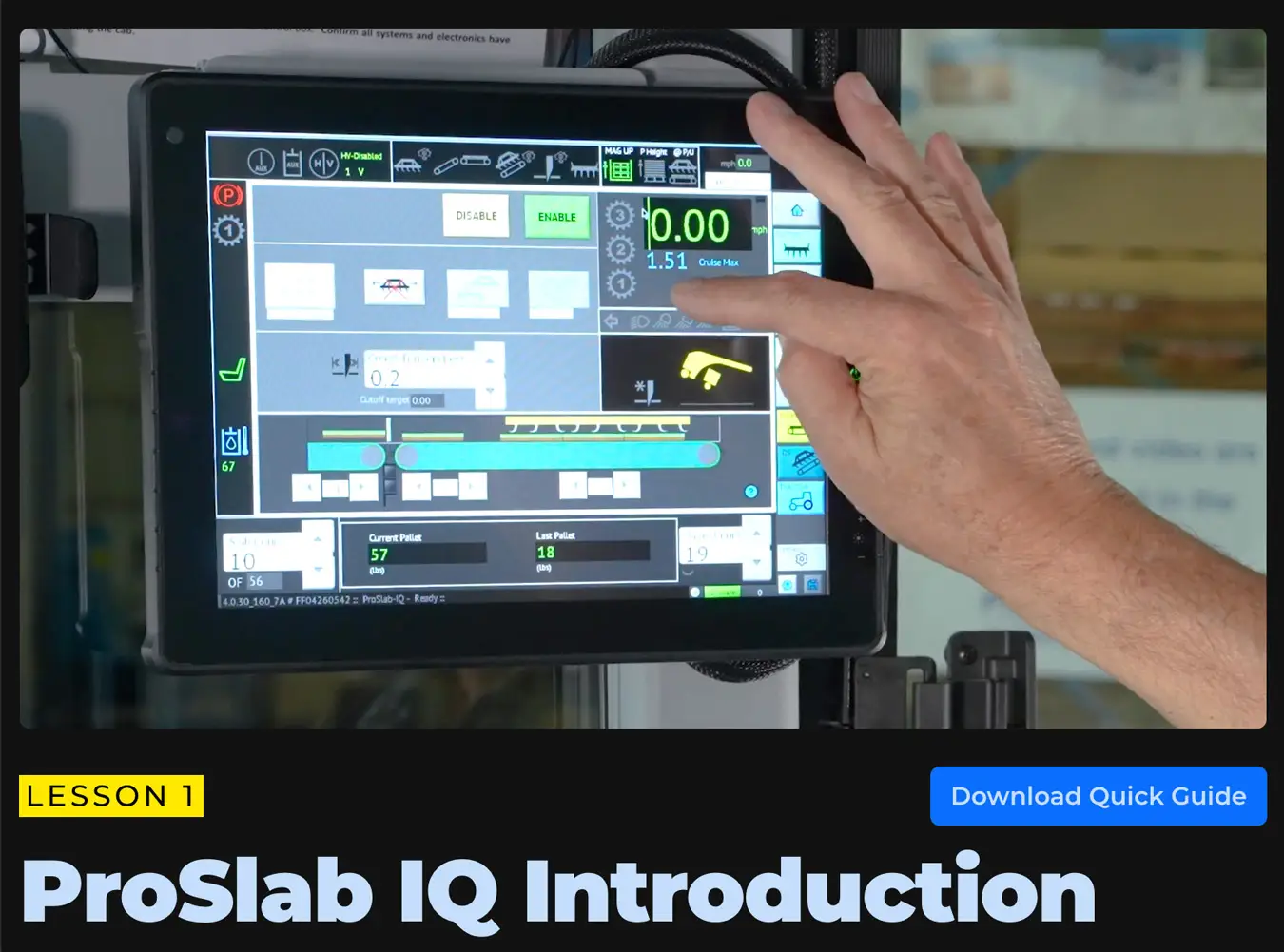
A lot of indicators that used to show up as plain text are now graphical icons, giving operators a more visual way to read what the machine is doing in real time. The new home screen groups things logically, so speed, cruise, gear, head boom sensor status, and key harvest indicators are all easier to find at-a-glance, whether you’ve been running a FireFly harvester for years or you’re new to it.

One of the bigger day-to-day improvements is the new homing process. Instead of homing the stacker and cutoff separately, operators can now press a single Global Home button to complete both in one step, cutting down on the time it takes to get the machine ready to harvest.

More Than a New Look

ProSlab IQ isn’t just a redesigned screen — it changes what the machine does for the operator. Adaptive stacking automatically adjusts stacker speed to match turf conditions and harvest pace, so operators don’t have to manually tweak settings, whether they’re handling tender turf or running at full speed.

The software also keeps a continuous eye on machine health. Built-in diagnostics help operators and farm managers catch issues early, schedule maintenance, and avoid unplanned downtime, while integrated Mercury Session Reports turn that data into clear, end-of-session summaries covering square footage harvested, total weight, pallet counts, scrap percentages, and more — all emailed automatically to the people who need to see them.

And it’s not just for new machines. ProSlab 155C and 160 owners can upgrade their existing harvester to gain adaptive stacking, enhanced diagnostics, and the full IQ interface. For a deeper look at everything ProSlab IQ can do, visit the ProSlab IQ overview page.

What the Course Covers

The training is broken into short, focused lessons so operators can learn at their own pace:

  • How the new home screen is laid out and where to find the information you rely on most
  • What the new graphical icons mean, since some indicators now look different even though they represent familiar functions
  • How the simplified homing process works
  • The everyday settings operators use to help produce the best possible pallets

It’s built to be intuitive and easy to follow, so you walk away understanding not just what changed, but why it makes day-to-day operation smoother.

Get Started

The course is free, and it’s the fastest way to get comfortable with ProSlab IQ before you’re relying on it out on the job. Start the course here.

And if you haven’t already, anyone working with any FireFly Robotics equipment should register for a free support portal account. It’s the best way to stay connected to training resources, documentation, and support as new tools like ProSlab IQ continue to roll out.

What’s Actually Changed

Most of the core functions of the harvester work the way they always have. What’s different is how that information gets to you.

A lot of indicators that used to show up as plain text are now graphical icons, giving operators a more visual way to read what the machine is doing in real time. The new home screen groups things logically, so speed, cruise, gear, head boom sensor status, and key harvest indicators are all easier to find at-a-glance, whether you’ve been running a FireFly harvester for years or you’re new to it.

One of the bigger day-to-day improvements is the new homing process. Instead of homing the stacker and cutoff separately, operators can now press a single Global Home button to complete both in one step, cutting down on the time it takes to get the machine ready to harvest.

More Than a New Look

ProSlab IQ isn’t just a redesigned screen — it changes what the machine does for the operator. Adaptive stacking automatically adjusts stacker speed to match turf conditions and harvest pace, so operators don’t have to manually tweak settings, whether they’re handling tender turf or running at full speed.

The software also keeps a continuous eye on machine health. Built-in diagnostics help operators and farm managers catch issues early, schedule maintenance, and avoid unplanned downtime, while integrated Mercury Session Reports turn that data into clear, end-of-session summaries covering square footage harvested, total weight, pallet counts, scrap percentages, and more — all emailed automatically to the people who need to see them.

And it’s not just for new machines. ProSlab 155C and 160 owners can upgrade their existing harvester to gain adaptive stacking, enhanced diagnostics, and the full IQ interface. For a deeper look at everything ProSlab IQ can do, visit the ProSlab IQ overview page.

What the Course Covers

The training is broken into short, focused lessons so operators can learn at their own pace:

  • How the new home screen is laid out and where to find the information you rely on most
  • What the new graphical icons mean, since some indicators now look different even though they represent familiar functions
  • How the simplified homing process works
  • The everyday settings operators use to help produce the best possible pallets

It’s built to be intuitive and easy to follow, so you walk away understanding not just what changed, but why it makes day-to-day operation smoother.

Get Started

The course is free, and it’s the fastest way to get comfortable with ProSlab IQ before you’re relying on it out on the job. Start the course here.

And if you haven’t already, anyone working with any FireFly Robotics equipment should register for a free support portal account. It’s the best way to stay connected to training resources, documentation, and support as new tools like ProSlab IQ continue to roll out.